Sunday, August 31, 2008

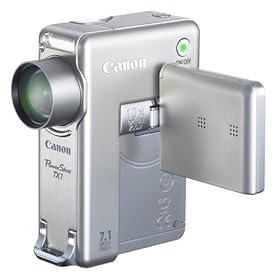
Canon PowerShot TX1 7.1MP Digital Camera


Canon PowerShot TX1 7.1MP Digital Camera with 10x Optical Image Stabilized Zoom


Manufacturer Description
With the PowerShot TX1, Canon takes a futuristic wish-list and makes it a reality. This is an Elph-sized camera with a whopping 10x optical zoom, that not only captures 7.1-megapixel images, but HD movies, too! The stylish vertical design in stainless steel houses plenty of premium advancements, including Image Stabilizer Technology, DIGIC III Image Processor, Face Detection Technology and automatic Red-eye Correction. And because you’ll want to take this compact wonder everywhere, it’s equipped with a built-in lens cover and tough new scratch-resistant, anti-reflective coating on the LCD screen.
PowerShot TX-1 Highlights

DIGIC III Image Processor With DIGIC III, you get images of superior quality, the camera functions at top efficiency and battery life is significantly enhanced. What’s more, DIGIC III enables Canon’s newly improved Face Detection Technology and Red-eye Correction to give you better, more true-to-life people shots. Simply press the Shutter Button halfway down, the PowerShot TX1 automatically pinpoints the faces in the scene and chooses the ideal focus point. To keep every face looking bright and natural -- without scary red eyes -- the camera controls exposure settings and flash, so every shot is just what you were shooting for.

DIGIC III features Face Detection AF/AE, which finds multiple faces in the frame and sets the most suitable focus point, when the shutter button is pressed halfway. And an additional new feature, Face Detection FE adjusts the flash, based on a person’s face on the screen. Exposure and flash are controlled to ensure proper illumination of both the faces and the overall scene, eliminating the common problem of darkened or overexposed faces.

Red-eye Correction detects and automatically corrects red-eye during playback for both regular and flash photography. In unusual cases where red-eye is not automatically detected, it can easily be corrected manually during playback mode from the LCD screen.

iSAPS Technology is an entirely original scene-recognition technology developed for digital cameras by Canon. Using an internal database of thousands of different photos, iSAPS works with the fast DIGIC III Image Processor to improve focus speed and accuracy, as well as exposure and white balance.

Full movie capabilities The PowerShot TX1 is a powerful, highly-advanced tool for recording movies. You’ll experience the unprecedented HD clarity of 720P recording at 30 fps. The camera’s Face Detection AF feature for still images is also available in movie mode: faces are detected and properly focused for a measurable improvement in movie quality. Sound is recorded in stereo, and 1080i component video playback is available for a true HD experience.

1.8-inch vari-angle, wide-view LCD Pull out the wide-view LCD and turn as needed to get just the right angle for your images and movies. The screen’s highly durable new coating resists scratches and fingerprints and is easy to wipe clean. New anti-reflective coating keeps the picture clear and visible even in bright sunlight.

ISO 1600 with ISO Auto Shift The PowerShot TX1 features ISO 1600 with ISO Auto Shift that increases the ISO sensitivity to where camera shake does not occur. Then camera shake can prevented and the ISO speed setting changes each time, automatically.

Elegant all-metal construction with built-in lens cap When you own a camera as compact as the TX1, you’ll want to take it everywhere. This camera is up tothe challenge with high-grade all-metal construction.The built-in ens cap opens when the camera is turned on and closes when the camera is turned off -- no worrying about scratches and smudges.

Shooting modes With 14 Shooting modes, including 7 Special Scene modes, you’re ready for whatever shot comes your way.

Auto The camera chooses all the settings so you can concentrate on your subject.
Manual The ultimate in creative control, you set ISO speed, exposure compensation and white balance.
Color Accent Choose to retain a single color in your image while other colors turn monochrome.
Color Swap Select a color and replace it with a color you specify for special effects.
Super Macro Close to almost touching distance to capture the subject detail.
Stitch Assist Build awe-inspiring panoramas by neatly aligning sequential images.
Movie Shoot in 720P HD (30 fps/30 fps LF), VGA (30 fps/30 fps LP), or QVGA (60 fps/30 fps).
Special Scene Modes
Portrait The camera sets a large aperture, focusing the subject and artistically blurring the background to make your subject "pop."
Foliage Capture brilliant shots of autumn foliage, greenery and blossoms.
Snow Shoot clear snow scenes without darkened subjects or an unnatural bluish tint.
Beach Get clear shots of people at a sunny beach without darkened faces.
Aquarium Achieve proper flash-free exposure and natural hues at indoor aquariums.
Indoor Reduce blur and improve color accuracy when shooting handheld indoors.
Night Snapshot Get natural-looking pictures with brighter backgrounds and subjects lit by flash.
The complete print solution The PowerShot TX1's Print/Share button makes direct printing easier than ever. Simply connect the TX1 to a Canon CP, Selphy or PIXMA Photo Printer or any PictBridge compatible photo printer, press the lighted Print/Share button and print! Also use the Print/Share button to transfer images to a computer (Windows and Macintosh).

Print your own ID photos in 28 different sizes or use the Movie Print function to output multiple stills from a recorded movie on a single sheet with a Canon Selphy Compact Photo Printer.

For desktop large-format printing, try one of the Direct Photo Printers that allow you to print without a computer in one of two ways: plug your compatible PowerShot camera into the Direct Photo Printer using the supplied USB interface cable, or simply insert a memory card into the supplied adapter. You can also connect the printer to your computer for more options. Print high-resolution, borderless images as postcards or 8.5 x 11-inch sheets within minutes.

Compact Photo Printers let you produce versatile, fun 4 x 6-inch postcards, 4 x 8-inch wide greeting cards or credit card size prints in just two easy steps: connect and press/print. Control the printer right from your camera's LCD screen. You get durable, dye-sublimated prints quickly with or without borders. Assortedpaper types let you create mini or credit card size labels. You can even take select Compact Photo Printers to a party or an outdoor picnic using an optional rechargeable battery.

http://www.e-wia.com/iso-template.html

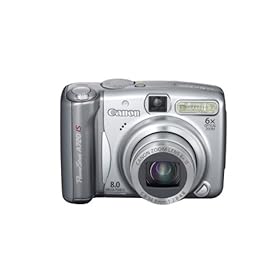
Canon PowerShot A720IS 8MP Digital Camera

Canon PowerShot A720IS 8MP Digital Camera with 6x Optical Image Stabilized Zoom

Manufacturer Description

The PowerShot A720 IS is the quintessential A Series camera in a popular line that matches high-end image quality with fun, easy-to-use features that deliver excellent cost performance. Top-notch specifications include 8.0-megapixel resolution and a long 6x optical zoom with Optical Image Stabilizer Technology for sharp images throughout the zoom range. Canon's DIGIC III Image Processor offers advanced Face Detection technology and Red-eye Correction for fantastic images. Even expand your creative possibilities with wide-angle and telephoto converter lenses.

PowerShot A720IS Highlights

8.0-megapixel resolution, high-power 6x optical zoom with Optical Image Stabilizer Top-notch core specifications allow the PowerShot A720 IS to produce a level of image quality that’s fully competitive with that of much higher-end cameras. A full 8.0 megapixels of resolution ensure rich depth and detail, and let you enlarge and crop images freely.


1x zoom/6x zoom
The camera is equipped with a genuine Canon 6x optical zoom to get you up close when it counts. Canon’s sophisticated Optical Image Stabilizer Technology keeps your shots blur-free, even in low light and at the long end of the zoom range. Miniature gyroscopic sensors detect motion, then send a corrective signal, effectively reducing camera shake.

DIGIC III Image Processor with Genuine Canon Face Detection Technology With DIGIC III, your images boast superior quality, the camera operates at top efficiency and battery life is enhanced. What’s more, DIGIC III enables Canon’s Face Detection Technology and Red-eye Correction to give you better, more true-to-life people shots. Simply press the Shutter button halfway down, and the camera automatically pinpoints the faces in the scene and chooses the ideal focus point. The camera controls exposure settings and flash to keep every face looking bright and natural. Red eyes can be corrected during playback.

DIGIC III features Face Detection technologies, giving the you best possible results in any shooting situation. Face Detection AF/AE sets the focus point and exposure for the faces of your subjects. Face Detection FE adjusts the flash to correctly illuminate your subject to provide the best balance between your subject and the overall scene, eliminating the common problems of over- and underexposed faces.
Face Detection in action


Red-eye correction detects and corrects red-eye during playback. In unusual cases where red-eye is not automatically detected, it can easily be corrected manually during playback mode.

iSAPS technology is an entirely original scene-recognition technology developed for digital cameras by Canon. Using an internal database of thousands of different photos, iSAPS works with the fast DIGIC III Image Processor to improve focus speed and accuracy, as well as exposure and white balance.

Easy-to-use Mode Dial with a wide range of shooting modes With a simple Mode Dial, the PowerShot A720 IS makes it easy to access the features of the camera you’ll use most. Select a scene mode, and the camera automatically sets shooting parameters to get you the best possible shot in that situation. You can also access Stitch Assist, Auto, Movie and Manual modes from the Mode Dial. And the convenience of using AA-size batteries, no special power adapters or chargers are needed wherever you go.

With 19 Shooting Modes including 7 Special Scene Modes, you’re ready for whatever shot comes your way.

Compatible with a wide range
of accessories including wide-angle and telephoto lens converters The PowerShot A720 IS is compatible with many of shooting accessories such as wide and tele converter lenses, High-Power Flash designed for all of the PowerShot models. Also, a waterproof case is available for your underwater shooting.

Print/Share button for easy direct printing and downloading The PowerShot A720 IS's Print/Share button makes direct printing easier than ever. Simply connect the A720 IS to a Canon CP, Selphy or Pixma Photo Printer or any PictBridge compatible photo printer, press the lighted Print/Share button and print! Also use the Print/Share button to transfer images to a computer (Windows and Macintosh).

Print your own ID photos in 28 different sizes or use the Movie Print function to output multiple stills from a recorded movie on a single sheet with a Canon Selphy Compact Photo Printer.

Direct photo printers For desktop large-format printing, try one of the direct photo printers that allow you to print without a computer in one of two ways: plug your compatible PowerShot camera into the direct photo printer using the supplied USB interface cable, or simply insert a memory card into the supplied adapter. You can also connect the printer to your computer for more options. Print high-resolution, borderless images as postcards or 8.5 x 11-inch sheets within minutes.

Compact photo printers Compact photo printers let you produce versatile, fun 4 x 6-inch postcards, 4 x 8-inch wide greeting cards or credit card size prints in just two easy steps: connect and press/print. Control the printer right from your camera's LCD screen. You get durable, dye-sublimated prints quickly with or without borders. Assorted paper types let you create mini or credit card size labels. You can even take select compact photo printers to a party or an outdoor picnic using an optional rechargeable battery.

Canon PowerShot SD870IS 8MP Digital Camera


Canon PowerShot SD870IS 8MP Digital Camera with 3.8x Wide Angle Optical Image Stabilized Zoom (Black)

Manufacturer Description

From the very first glance, the smooth shape and bold lines of the stylish PowerShot SD870IS Digital ELPH signal that this is no ordinary camera. With 8.0 megapixels of resolution, an Optical Image Stabilizer, and 3.8x optical zooming, the SD870IS Digital ELPH boasts impressive specs as well as a host of convenience features. Face Detection Technology for worry-free people shots. A large 3.0-inch LCD to give you a perfect view of your scene. The Auto ISO Shift and ISO 1600 deliver brilliant images in challenging lighting.

PowerShot SD870IS Highlights


3.8x optical zoom in action
Stylish dual-tone 8.0-megapixel Digital ELPH in two elegant colors You deserve a camera as individual as you are. That's why the PowerShot SD870IS Digital ELPH is available in a choice of two head-turning models. Select from your choice of the impressive matte black or the sophisticated chrome silver front-ring design. Both feature a gleaming metallic body whose smooth, simple shape is handsomely contrasted with bold side lines. In addition, both also offer 8.0 megapixels of resolution so you get images with the high-degree of detail and richness of color that enables you to print, crop, and enlarge for maximum self-expression.


3.8x wide-angle zoom lens to get more family and friends into one perfect photo With a wide-angle 3.8x optical zoom lens equipped with Canon's advanced Optical Image Stabilizer Technology, you've got what it takes to capture astonishing, lavishly detailed close-ups with total confidence. Now you don't even have to worry about camera shake getting in the way of perfect pictures. Because even at maximum telephoto, the SD870IS Digital ELPH keeps you rock steady. So you can create images that are sharp, clear, and bright--just like you want them to be. You'll amaze yourself and others with what you can achieve with the SD870IS Digital ELPH.


Large high-quality 3.0-inch PureColor LCD screen with wide viewing angle The camera's 3.0-inch LCD screen gives you the big picture, whether you're shooting, reviewing, or showing off your images. This extra-durable, high-resolution screen with tough scratch-resistant coating on the anti-reflective, PureColor LCD screen offers a crisp, clear picture to make shooting, playback, and using the camera's menu functions especially convenient. Clear and bright, it also features Night Display for easy viewing in low light.

Canon technology maximizes quality and performance Genuine Canon Face Detection Technology sets the focus, exposure, and flash automatically, leaving you free to compose a group, capture an unguarded moment, or coax the perfect smile.


Find multiple faces with Canon's improved Face Detection technology
DIGIC III features Face Detection technologies, giving the you best possible results in any shooting situation. Face Detection AF/AE sets the focus point and exposure for the faces of your subjects. Face Detection FE adjusts the flash to correctly illuminate your subject to provide the best balance between your subject and the overall scene, eliminating the common problems of over- and underexposed faces.

With DIGIC III, your images boast superior quality, the camera operates at top efficiency and battery life is enhanced. What's more, DIGIC III enables Canon's Face Detection Technology and Red-eye Correction to give you better, more true-to-life people shots. Simply press the Shutter Button halfway down, and the camera automatically pinpoints the faces in the scene and chooses the ideal focus point. The camera controls exposure settings and flash to keep every face looking bright and natural. Red eyes can be corrected during playback.

iSAPS Technology is an entirely original scene-recognition technology developed for digital cameras by Canon. Using an internal database of thousands of different photos, iSAPS works with the fast DIGIC III Image Processor to improve focus speed and accuracy, as well as exposure and white balance.

Red-eye correction detects and corrects red-eye during playback. In unusual cases where red-eye is not automatically detected, it can easily be corrected manually during playback mode.

The PowerShot SD870IS Digital ELPH features ISO 1600 and High ISO Auto settings that reduce the effects of camera shake and sharpen subjects in low-light situations, giving you greater shooting flexibility.

17 Shooting Modes, Including 10 Special Scene Modes Advanced presets for the best possible photos under certain conditions.

The Complete Print Solution

Print/Share Button for easy direct printing and downloading, plus ID Photo Print and Movie Print with select PIXMA Photo Printers, CP, and SELPHY Compact Photo Printers.

The PowerShot SD870IS Digital ELPH's Print/Share button makes direct printing easier than ever. Simply connect the SD870IS Digital ELPH to a Canon CP, SELPHY, or PIXMA Photo Printer or any PictBridge compatible photo printer, press the lighted Print/Share button, and print! Also use the Print/Share button to transfer images to a computer (Windows and Macintosh).

Print your own ID photos in 28 different sizes or use the Movie Print function to output multiple stills from a recorded movie on a single sheet with a Canon SELPHY Compact Photo Printer.

What's in the box:

PowerShot SD870IS Digital ELPH digital camera, lithium battery pack NB-5L, battery charger CB-2LX, 32MB SD memory card SDC-32M, wrist strap WS-DC2, Digital Camera Solution CD-ROM, USB interface cable IFC-400PCU, AV cable AVC-DC300

Panasonic Lumix DMC-FX7K 5MP Digital Camera


Panasonic Lumix DMC-FX7K 5MP Digital Camera with 3x Image Stabilized Optical Zoom (Black)

Amazon.com Product Description
Optics and Resolution
Featuring a 5-megapixel CCD sensor, the >DMC-FX7 delivers a wide range of detail and color with images up to 2560 x 1920 pixels--enough information to make photo-quality prints up to 13 by 17 inches. Leica DC Vario-Elmarit 3x zoom lens, with 3 aspheric elements, combines comfortably small size with superb image rendering. By combining with a 4x digital zoom, users will have an equivalence of a 12x zoom lens in a very compact body, though users should note that digital zoom degrades picture quality.
Movie Mode
The >DMC-FX7 lets you shoot QuickTime Motion JPEG video at resolutions up to 320 x 240 pixels with sound. The amount of video you can capture is limited by space on the memory card; you'll fit more at low quality (10 frames-per-second) than at high quality (30 frames-per-second). The movies aren't camcorder quality, but they're fun and convenient, and they're perfect as e-mail attachments. You can also record audio comments, up to five seconds in length, for your still pictures.

More Features

Flip Animation: Allows you to create your own frame-by-frame animations.
Unlimited Consecutive Shooting: Allows consecutive shooting up to the capacity of the SD memory card.
2.5-inch diagonal polycrystalline TFT LCD display (114k pixels)
Mega Burst Shooting Mode: Shoot up to seven images at three or two frames-per-second in standard resolution, or up to four images in fine resolution. This option is designed to provide you with the best selection of photos during action, such as a sporting event.
Storage and Transfer
Images and video are stored on Secure Digital (SD) memory cards. A 16 MB SD card is included. Files can be downloaded to either a Mac or PC via USB connectivity, which means it can be connected to any USB-based Windows 98/Me/2000/XP and Mac OS 8.6 or later computer without installing any software.

Printing
This camera supports the PictBridge standard. PictBridge is a technology that lets you transfer pictures from a digital camera to a compatible printer, without a PC or image-editing software. Because PictBridge is an industry standard, users can connect PictBridge-compatible devices made by many different manufacturers. Learn more about PictBridge.

Power and Size

The camera is powered by lithium-ion battery pack (included with charger). It measures 1.97 by 3.70 by 0.95 inches and weighs 0.30 pounds.

What's in the Box

>DMC-FX7 digital camera, battery charger, battery pack, battery carrying case, 16 MB SD memory card, lens cap, lens hood with adaptor, A/V and USB cables, strap, and CD-ROM

Panasonic Lumix FX100S 12.2MP Digital Camera


Panasonic Lumix FX100S 12.2MP Digital Camera

Manufacturer Description
The compact Lumix DMC-FX100 is the world’s first camera to feature 12.2-megapixel resolution with a 28mm wide-angle lens. In addition, the DMC-FX100 delivers 3.6x optical zoom, f/2.8 brightness, a 1/1.72-inch CCD and Intelligent Image Stabilization with Mega O.I.S. and Intelligent ISO Control. It's equipped with a 2.5-inch LCD screen, and a slim, lightweight design makes it extremely portable and stylish.
Furthering Panasonic’s commitment to "Living in High Definition," the DMC-FX100 can also record 1920 x 1080 high-definition still pictures and 1280 x 720 at 15 frames per second motion pictures, both perfect for viewing on 16:9 plasma HDTVs.

Lumix FX100K Highlights

Bright f2.8, 28mm wide-angle Leica lens and 12.2-megapixel CCD An advanced 28mm wide-angle, 3.6x optical zoom Leica DC lens system featuring four aspherical lenses (including an EA lens) with five aspherical surfaces. A large 1/1.72-inch CCD with an effective 12.2 megapixels -- the highest resolution in its class. These features add up to make the FX100 a superior camera with extraordinary expressive power. The FX100 also features an Extended Optical Zoom, which extends zooming to as high as 7x. And zooming is super easy: just press the Easy Zoom button and the FX100 jumps instantly from 1x to 3.6x to 7.0x.


Intelligent ISO Control in action


Intelligent ISO Control prevents motion blur Intelligent ISO Control makes it easier to take clear, crisp shots even if your subject moves. Offered in the FX100, this innovative feature detects any movement and automatically raises both the ISO setting and the shutter speed accordingly, preventing motion blur. If the subject is still, the camera shoots at a low ISO setting and you get beautiful, natural-looking images.

Prevent hand-shake blur with Mega O.I.S. Hand-shake is a problem with most small cameras, but not with the FX100. Mega Optical Image Stabilization (O.I.S.) automatically compensates for hand-shake. You get clear, beautiful shots even when shooting in dim lighting, shooting macro close-ups, or taking self-portraits.

Consecutive shooting at 8 frames per second Mega Burst shooting lets you take consecutive shots at a swift two shots per second. The new Hi-Speed Burst Mode goes a step further, letting you snap off consecutive shots at a lightening-fast eight shots per second. This makes it easier to catch the perfect action shot of a fast-moving subject.
Capture up to 8 frames per second


Additional Features


20 scene modes including the enhanced High-Sensitivity mode up to ISO 6400 with flash from up to 16m away
16:9 wide high-definition motion images (1280 x 720 pixels at 15 f.p.s.)
Category Playback sorts images into categories such as portraits, landscapes, nightscapes and events
Quick settings without taking your eyes off the subject
Up to 320 shots on a single battery charge

Panasonic Lumix DMC-FX500S 10.1MP Digital Camera


Panasonic Lumix DMC-FX500S 10.1MP Digital Camera with 5x Wide Angle MEGA Optical Image Stabilized Zoom (Silver)

Manufacturer Description

The Lumix DMC-FX500 is Panasonic's first digital camera with a 3-inch touch-screen LCD, and also features a 25mm ultra-wide-angle Leica DC lens, 5x optical zoom and 10.1-megapixel resolution. With a dual control system using both touch-screen and joystick operation, the ability to record high-definition video and advanced Intelligent Auto technologies, the FX500 packs both innovative features and intuitive design.

The FX500 has a hybrid control system that combines joystick control with touch-screen operation, so users can make fine adjustments by touch, using their finger, or the included Lumix stylus-pen. In manual exposure mode, adjustments can be made using the on-screen sliders to adjust aperture and shutter speeds. You can also set the auto focus and exposure in frames by simply touching the subject, on screen, while recording. In playback mode, a new Easy Organization menu allows for photos to be selected and viewed by scrolling through the thumbnails located below the main window. Then, users can edit the titles using an on-screen keyboard.

Plus, with an ultra-wide-angle, 25mm lens, the FX500 can capture almost double the photo area at the same shooting distance compared with a conventional 35mm lens. Also new is Auto Focus (AF) tracking, a feature that tracks the photo subject even if it moves after the AF is set -- especially helpful for catching active children or pets.

Panasonic’s iA (Intelligent Auto) mode is an advanced system of technologies that engage automatically, so the user does not have to change any settings. Maximizing the iA mode, users can go a step further and easily set auto focus and exposure by simply touching the screen. This kind of quick, easy operation is made possible with the touch-screen technology.

Additional Features

Intelligent Exposure: To help correct photos from being under- or over-exposed, the FX500 instantly analyzes the framed image and adjusts the brightness in areas that are too dark because of dim lighting, backlighting or the use of the flash.
Digital Red-eye Correction: Helps eliminate the red-eye problem that sometimes results when taking flash shots at the night. Incorporated into the built-in flash, the camera emits a small preliminary flash before the main flash, detects red-eye and digitally corrects it.
MEGA O.I.S.: Gyrosensors detect hand-shake and the lens system shifts to compensate, helping to prevent hand-shake from creating a blurry image.
Intelligent ISO: Determines if the photo subject is moving and changes the ISO setting and shutter speed accordingly.
Intelligent Scene Selector: Senses the ambient conditions, recognizes the shooting environment and automatically selects the appropriate scene mode from: Scenery, Portrait, Macro, Night Portrait or Night Scenery mode.
Face Detection: Detects faces anywhere in the frame and automatically chooses the optimal focus and exposure settings so portraits come out clear and crisp. Detecting up to 15 faces, Panasonic’s Face Detection can even track a face if the subject is moving.
Continuous AF: Maintains focus on the subject even without the user pressing a shutter button halfway, thus minimizing the AF time.
Other features include the ability to take1280 x 720p HD video content and still photos with a 16:9 aspect ratio, perfect for viewing on an HDTV. In addition, the FX500 incorporates the Venus Engine IV processor, featuring more advanced digital signal processing technology for taking even higher-quality images. The fdsa proprietary Venus Engine IV also heightens the detection accuracy and corrective features in both MEGA O.I.S. and Intelligent ISO Control.

Samsung S860 8.1MP Digital Camera


Compact and stylish, the Samsung S860 digital camera features a 3x optical zoom, a Samsung SHD lens, and Digital Image Stabilization (DIS) to help minimize the effect of camera shake and produce sharp, clear images, especially in low-light environments. You can also take advantage of advanced features such as Face Detection and Self Portrait mode.

Face Detection technology makes taking pictures of family and friends a snap, as it detects up to nine faces and automatically adjusts focus and exposure to ensure better composition and image quality. Self Portrait mode is a unique functionality that takes the guessing out of taking a self portrait. By utilizing Face Detection technology, the S860 automatically detects the subject's face, adjusts focus and exposure, and will only allow a photo to be taken if the subject is centered in the frame.
Face Detection technology


Self Portrait mode


You can also benefit from the camera's Function Description feature. Designed to reduce the intimidation factor of the cameras' various modes, Function Description automatically provides a brief and easy to understand description of each setting when scrolling through the cameras' menus, helping the end-user determine which setting is appropriate for their current shooting scenario. Additionally, with 11 scene modes to choose from, including Night, Portrait, Children, Landscape, Close-Up, Sunset, Dawn, Backlight, Fireworks, Beach & Snow, and Self Portrait, shooters can rest assured that they'll be able to effortlessly adjust the camera.

The S860 also boasts a special effects "E" button, which gives users instant access to a host of creative controls, including options for resizing and rotating images, adjusting brightness, contrast and saturation levels, fixing red eye, and manipulating color such as saving captured images as B&W, Sepia, Red, Blue, Green, and Negative. Users can also shoot video with the S860. Movie mode lets users capture video in one of two resolutions, 320x240 or 640x480, at 30 frames per second in AVI (MJPEG) format. Just as in still-picture mode, the DIS image stabilization system can be engaged to compensate for camera shake and to reduce blur.

For maximum versatility, the S860 can be powered by two, readily available AA alkaline batteries, a considerable benefit for travelers and photographers on the go.

Samsung S860 Highlights

8.1 megapixels, 3x optical zoom The Samsung S860 is a high-resolution digital camera that is equipped with a true-color filtered 8.1-megapixel CCD. This allows the Samsung S860 to produce even better images and take detailed photos for printing up to poster size. In addition, the Samsung S860 has a 3x optical and 3x digital zoom giving 9x total zoom when combined.

DIS (Digital Image Stabilization) function DIS technology prevents the degradation of image clarity and colour which is sometimes found in flash photography. With DIS the effects of image blur are reduced in lower light conditions.You can even take well exposed, sharper pictures in low light conditions without using a flash at all, which guarantees brighter and more natural pictures.
Digital Image Stabilization in action


Face Detection AF & AE With the Face Detection AF & AE function, the Samsung S860 enables the user to take better portrait pictures more easily. The function detects faces and automatically focuses on them; the brightness of the faces is adjusted optimally for beautiful portrait pictures.

2.4-inch Intelligent LCD The Samsung S860 has a 2.4-inch LCD with improved contrast and color reproduction for easy image framing and reviewing.


11 Scene Modes You have a choice of scene modes to help you get the perfect shot in any situation. By automatically adjusting the camera's setting according to the situation, you can be sure of getting great pictures effortlessly. The scene modes provided are Children, Landscape, Close-up, Text, Sunset, Dawn, Backlight, Fireworks, Beach & Snow, Night and Portrait.

Function Description & Photo Help Guide

Provides a brief description of the main functions and different modes the camera has to offer.
The different icons, scene modes and other features are described in simple and easy to understand terms to improve the interaction between the user and camera.
A guided tour of how to take better images. Easy to follow tips instruct the user how to obtain excellent results.

Digital Camera